YECA Students
This page provides helpful information for York Early College Academy students during their time at York College.
Helpful Information
How do I activate my CUNYfirst account?
CUNYfirst is the internet-based application that the City University of New York uses for registrations, student schedules, and other student services. York Early College Academy students will need to become familiar with CUNYfirst to access many of the tools and resources that are available when participating in college courses at York. You will also need to be aware of your CUNYfirst id or EMPLID. See the following steps to activate your CUNYfirst account.
Visit the CUNYfirst homepage.
- In the gray Sign-In box, click the " New User" link.
- On the Account Activation screen, enter your name, date of birth, last four digits of your Social Security number or External ID number, and security phrase, then click "OK."
- On the following screen, select five security questions and provide answers for each of them. Answers are case-sensitive.
- On the last screen, enter a password. It must be between eight and 13 characters and must contain at least one number and one capital letter.
- After choosing a password, a confirmation page will appear, displaying your username and Employee ID.
Be sure to save your username and CUNYfirst id number.

How do I activate Multi-Factor Authentication?
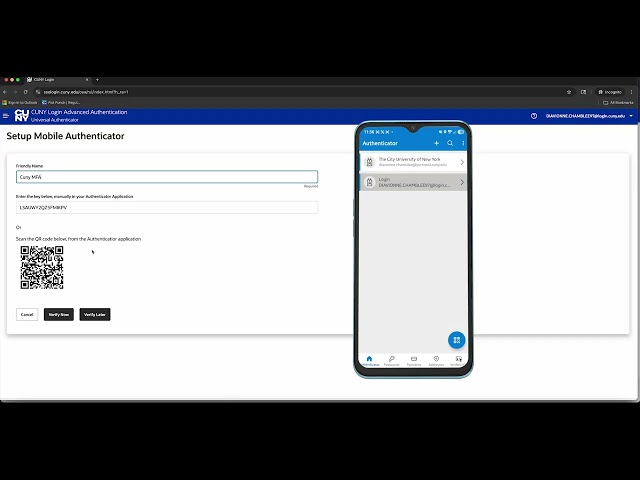
Multi-factor authentication (MFA) is a security enhancement that requires two forms of verification when using your CUNYfirst username and password and adds critical protection for your sign-on credentials. See the video below for tips on how to activate multi-factor authentication.
How do I activate my York College E-mail account?
This account will serve as your official email for all York College and CUNY communications. This account will be the one you use to login and authenticate. The account will drive two additional identities, A York-specific address (example: firstname.lastname##@stu-mail.york.cuny.edu) and the other A universal CUNY address (cunyloginusername@cuny.edu). Temporary Password: Your DOB (Yc + MMYYYY + LAST 4 of External ID)
Use the above credentials here
How do I access Brightspace?
Brightspace is the learning management system that is used to support online and in-person courses at York College. Instructors will post the course syllabus, reading materials, assignments, and due dates on Brightspace. Here is an additional tutorial to assist you in navigating the features in Brightspace. Use your CUNYfirst username and password to login.
How do I activate my Navigate Account?
Stay connected to your faculty, advisors, and fellow students with the Navigate Student app. Use the app to make appointments, connect with campus resources, view your class schedule, among many more features. Sign up to receive alerts and text or email messages.
Download "Navigate Student" app in the App Store or Google Play today! Once installed, login with your CUNYfirst credentials.
How do I activate my York Network Account?
Your York College “Network” account is a critical access ID for campus resources. This link will provide the correct account information once you provide your CUNYfirst EmpID and the last 5 digits of your external id number. This account uses the same temporary password convention as your York College student email account: "Temporary Password: (Uppercase (Y) + Lowercase (c) + MMYYYY + LAST 4 of External ID - (eg. Yc1219985400)". The account is generally provisioned during the registration process but is not fully active until a few days before the start of classes.
Find and Activate
Once the new password is setup you can use the York College Student Network Account to access the following resources: York College Cardinal App (download from Google Play or App Store, look up York College); Student VPN; YCWIFI (campus-wide wireless network services); York College Library printing, scanning, and copying services.
Office365
While participating in college courses students will have to submit research papers and presentations. These assignments should be produced with appropriate word-processing software. CUNY has made access to full student versions of Microsoft Word, Excel, PowerPoint, and other tools available to York Early College Academy students through the Microsoft Office Suite. Use your CUNYfirst username and password to log in.
How do I get my York College ID Card?
All Staff, Faculty, and Current Registered Students Must Possess a Valid York College ID. For your convenience we have added a York College mobile ID option. Your new or missing YC ID photo can be submitted online to Public Safety for review and approval. Use the following link for id photo requirements and upload instructions: YC ID Online Photo Submission.
View the York Early College Academy Handbook for additional information and resources.
Revised: June 24, 2026
York College / CUNY
94 - 20 Guy R. Brewer Blvd.
Jamaica, NY 11451
P: 718-262-2000